
Introduction
https://mirola.io/features
Someone opened your latest email campaign six times.
They did not reply, book a call or make a purchase. Unless you regularly dig through campaign reports and export files, you may never know who they are.
This is where many small businesses lose potential revenue. The problem is not always a lack of leads. Often, the real issue is failing to recognise the interested prospects already sitting inside existing email and CRM data.
In this guide, we explain how to find warm leads in your email campaign data, separate real engagement from false opens and create a clean list your sales team can act on.
What is a warm lead?
A warm lead is someone who has already shown an interest in your business.
They may have opened several emails, clicked a link, returned to a campaign on a later date or engaged with multiple pieces of content.
They are not necessarily ready to buy immediately, but they are usually more valuable than a completely cold contact because they already recognise your business and have interacted with your marketing.
Why email opens can be misleading
Email open data is useful, but it is not always accurate on its own.
Some corporate mail servers and security systems automatically scan incoming messages. These scans can register as opens even when the recipient has not personally read the email.
Privacy features and email preloading can also create activity that looks like genuine engagement.
For this reason, identifying warm leads should involve looking for patterns rather than relying on one open count.
The signs of genuine engagement
Multiple opens
Someone opening an email several times may be returning to check pricing, review an offer or share information with a colleague.
Multiple opens are useful, but they should be considered alongside other engagement signals.
Opens at different times of day
A group of opens happening within a few seconds may be caused by an automated security scanner.
Opens spread across the morning, afternoon or evening are more likely to represent genuine human engagement.
Returning on a later day
A person who returns to an email a day or more after it was sent may still be considering the offer.
This is often a stronger signal than several opens recorded immediately after delivery.
Engagement across several campaigns
A contact who repeatedly opens different campaigns may have a continuing interest in your services.
For example, they may have engaged with a product announcement, a case study, a pricing email and a follow-up message.
A practical warm-lead example
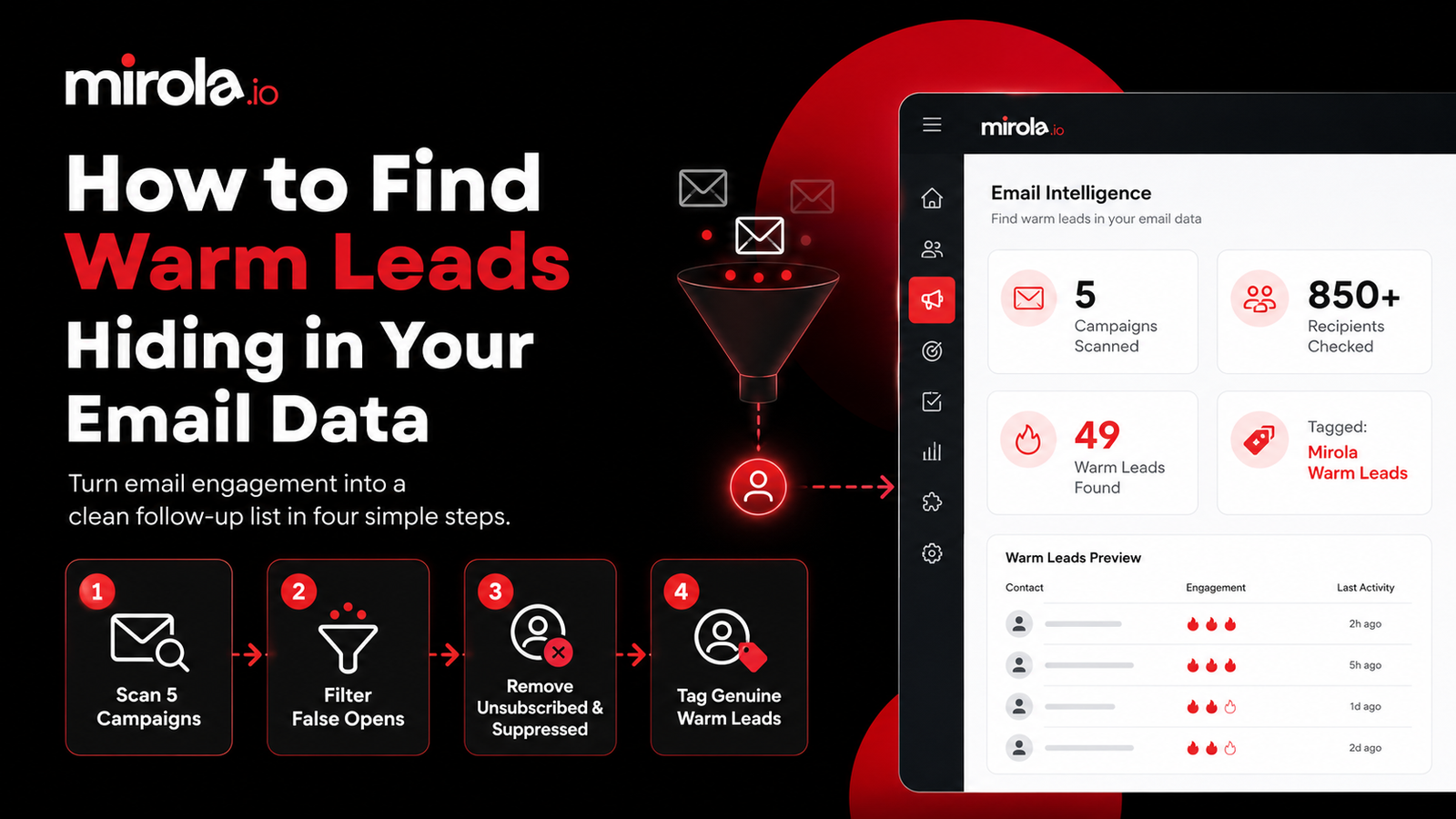
Imagine you have sent five email campaigns to more than 850 recipients.
You want to identify everyone who:
Opened an email more than twice
Opened it at different times of day
Returned on a later date
Has not unsubscribed
Is not included on a suppression list
By hand, this would involve exporting five campaign reports, combining the data in a spreadsheet, comparing timestamps, checking opt-out records and manually tagging the remaining contacts.
That could easily take most of a working day.
Using Mirola, the same instruction can be given in plain English:
From my last five email campaigns, find everyone who opened more than twice across different times of day. Keep anyone who returned on a later day, exclude unsubscribed or suppressed contacts, and tag the rest Mirola Warm Leads.
Mirola then checks the campaign data, filters likely mail scanners, removes contacts who should not be contacted and tags the genuine warm leads.
In this example, 49 warm leads were identified from more than 850 recipients.
How CRM automation simplifies the process
CRM automation removes the need to work across several CSV exports and manually update contact records.
A CRM can:
Analyse multiple email campaigns
Compare recipient activity
Review open times
Filter likely automated scans
Check unsubscribe records
Check suppression lists
Create a warm-lead segment
Tag contacts automatically
The result is a focused sales list without the manual administration.
What should you do with warm leads?
Identifying warm leads is only useful when you follow up appropriately.
Send a personal follow-up
A short, relevant email from a salesperson or business owner can work well.
Avoid telling the recipient exactly how many times they opened an email. Instead, refer naturally to the topic they appeared interested in.
For example:
Hi Sarah, I wanted to follow up on the information we recently sent about our CRM automation service. Was there anything you wanted me to explain or demonstrate?
Add them to an educational sequence
Some people are interested but not ready to speak to sales.
You could send them a short sequence containing a customer story, a demonstration, a comparison guide or answers to common questions.
Create a sales task
High-value leads can be assigned directly to a team member with a clear next action.
That might include reviewing a previous enquiry, sending a case study or making a follow-up call.
Do not treat every open as buying intent
Email engagement is a useful signal, but it does not guarantee someone is ready to purchase.
A contact may reopen an email because they are researching, forwarding it internally, comparing suppliers or looking for contact information.
Warm leads should therefore be treated as contacts who deserve further attention, not guaranteed sales.
The strongest approach combines email engagement with other CRM information, including previous enquiries, quotes, website activity, meetings and pipeline history.
Other CRM tasks you can automate
The same approach can be used to find:
Quotes that have gone quiet
Clients who have not been contacted recently
Opportunities stuck in the same pipeline stage
Leads without a next action
Customers approaching a renewal date
These small administrative tasks often make the difference between a CRM that stores data and one that actively supports sales.
Conclusion
Small businesses often spend heavily on generating more enquiries while overlooking the interested prospects already inside their own data.
By analysing email engagement, filtering false opens and checking communication preferences, you can identify the contacts most likely to benefit from a relevant follow-up.
Mirola helps businesses do this using straightforward instructions instead of exports, spreadsheets and repetitive admin.
Run your CRM by asking it, not by clicking through it. https://mirola.io/features