

Mirola MCP
Talk your way through your CRM
Connect Claude or ChatGPT to Mirola and ask for the outcome. It creates the contacts, writes the templates, sets the tasks and builds the workflows — in your account, not in a chat window you copy and paste in later.
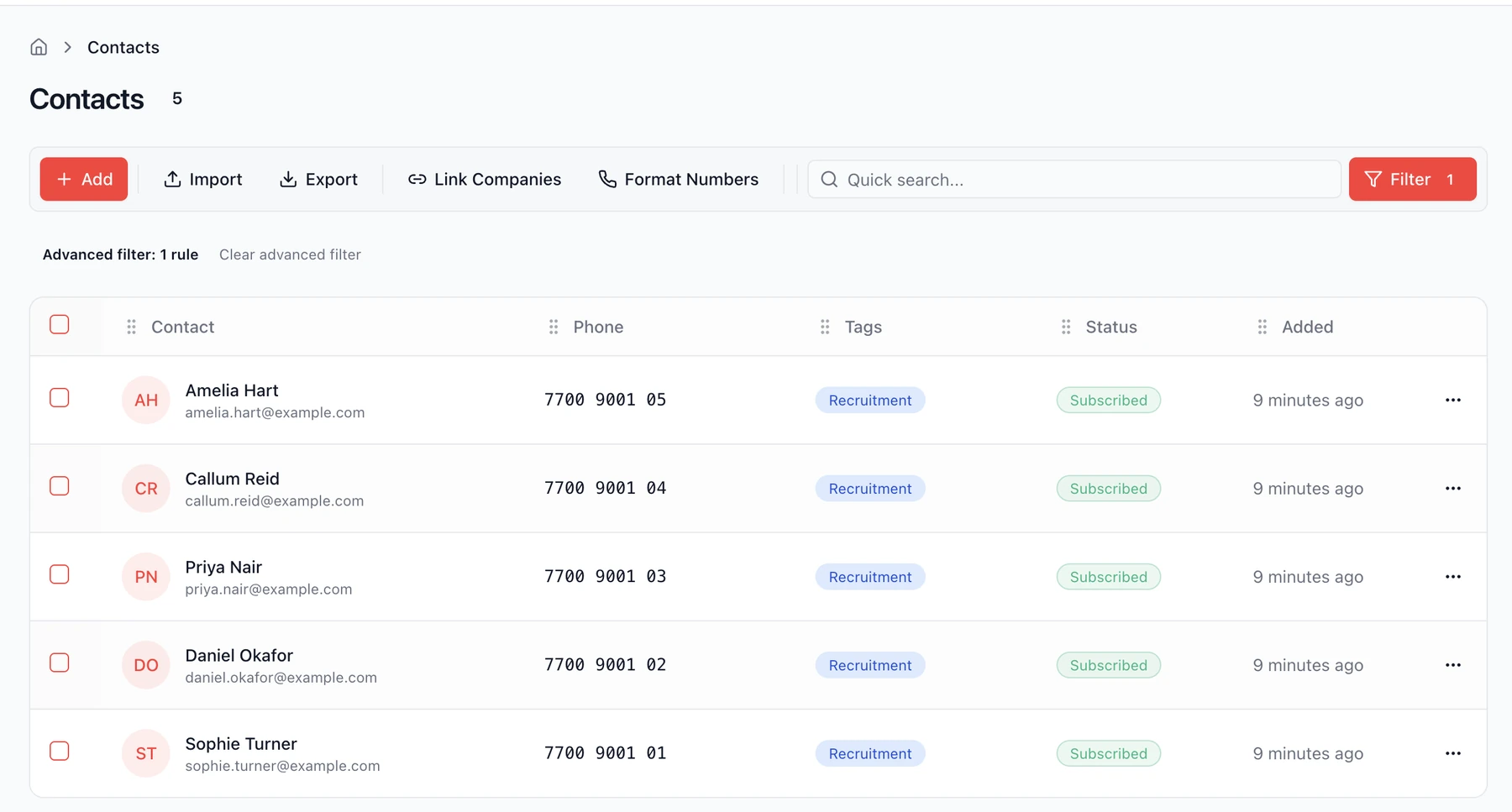
Tag these five applicants and subscribe them.
Works alongside the other tools in your AI assistant.
Included on every plan, from £39/month
Follow-ups
Chase buyers, landlords and leads without living in the inbox.
Recalls & renewals
Find who's due, nudge them, and set the reminder on the right record.
Matter / project updates
Client updates that land on the file, not just in a chat window.
Role fills & pipelines
Create opportunities, move stages, and chase candidates in one ask.
Email templates your AI can build
Outlook-safe templates saved straight into Mirola Marketing.
Ask for it. It’s done.
Four real examples. Every screenshot below is inside Mirola after Claude and ChatGPT have done their job — nothing staged, all built now waiting to help streamline your workflow.
“Here are five people who applied for the accounts role. Add them, tag them Recruitment, and subscribe them to email.”
Five contacts created with job titles, companies and phone numbers, all tagged and subscribed. About twenty seconds.
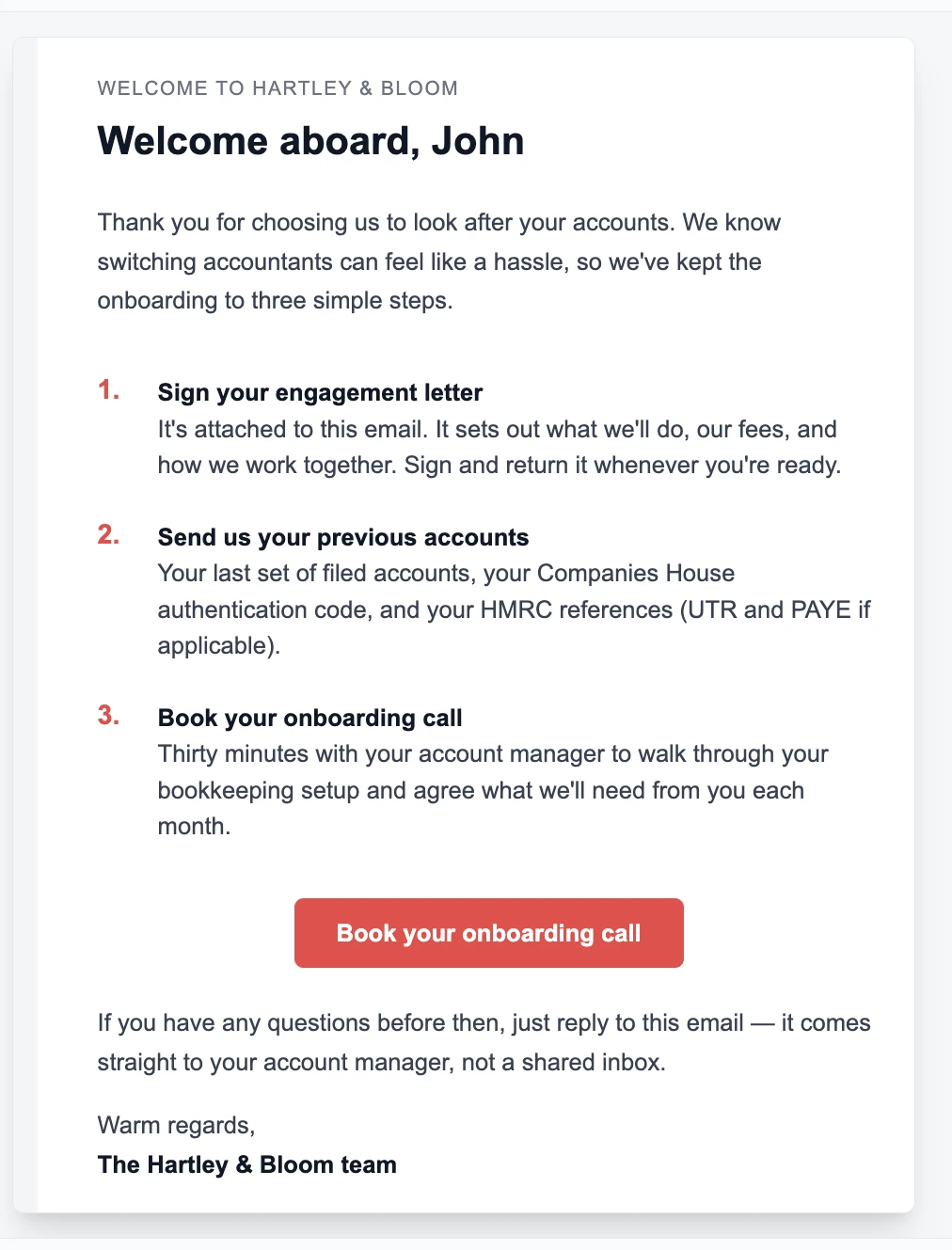
“Write our new client welcome email. Cover the engagement letter, what we need from them, and booking the onboarding call.”
A finished, responsive email template saved in Marketing, ready to send or edit. Not a draft in a chat window.
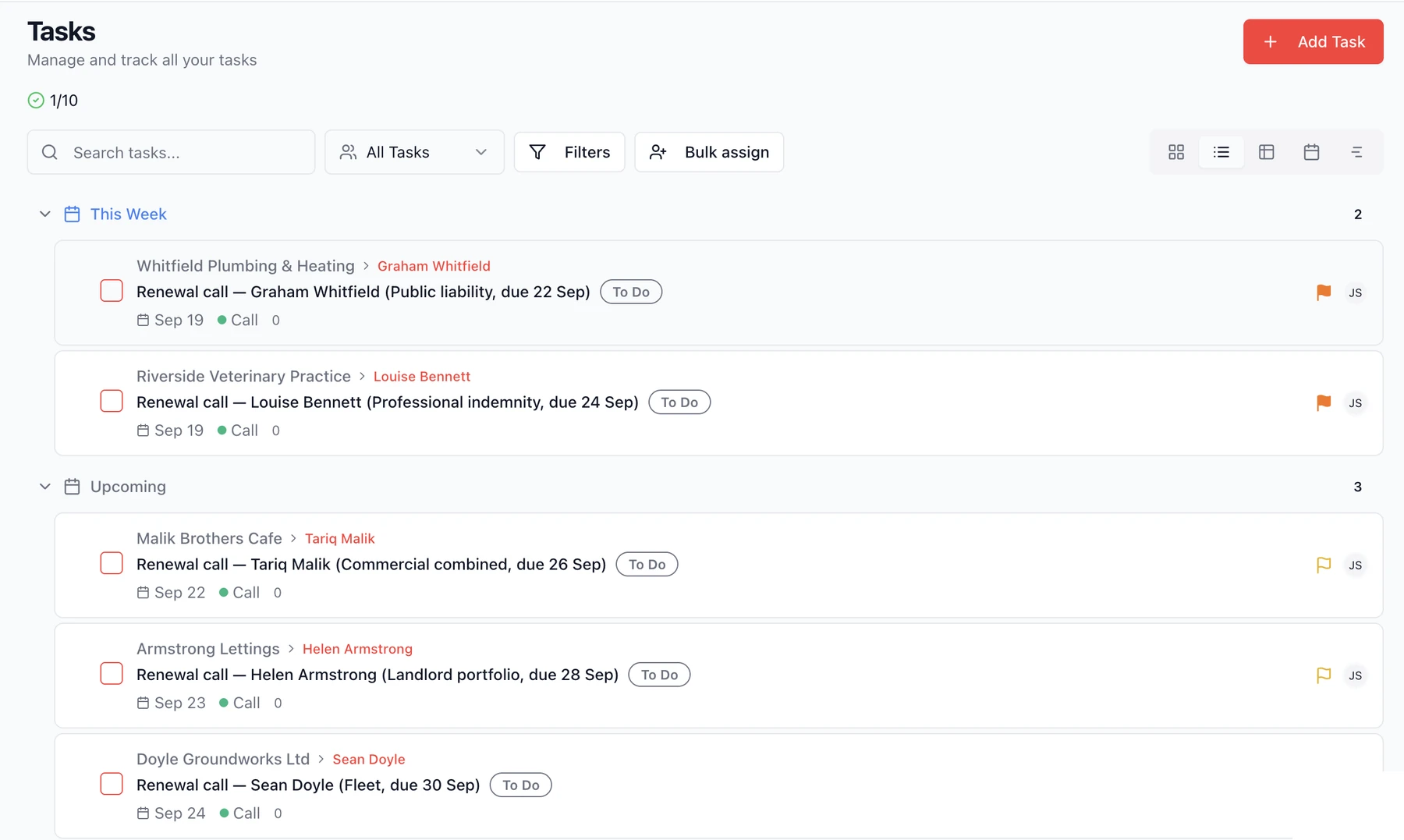
“Everyone with a policy renewing this month needs a call booked before the renewal date.”
Five tasks, each on the right contact, with the policy type, the renewal date and a priority. The context is in the task, so whoever picks it up knows what to say.
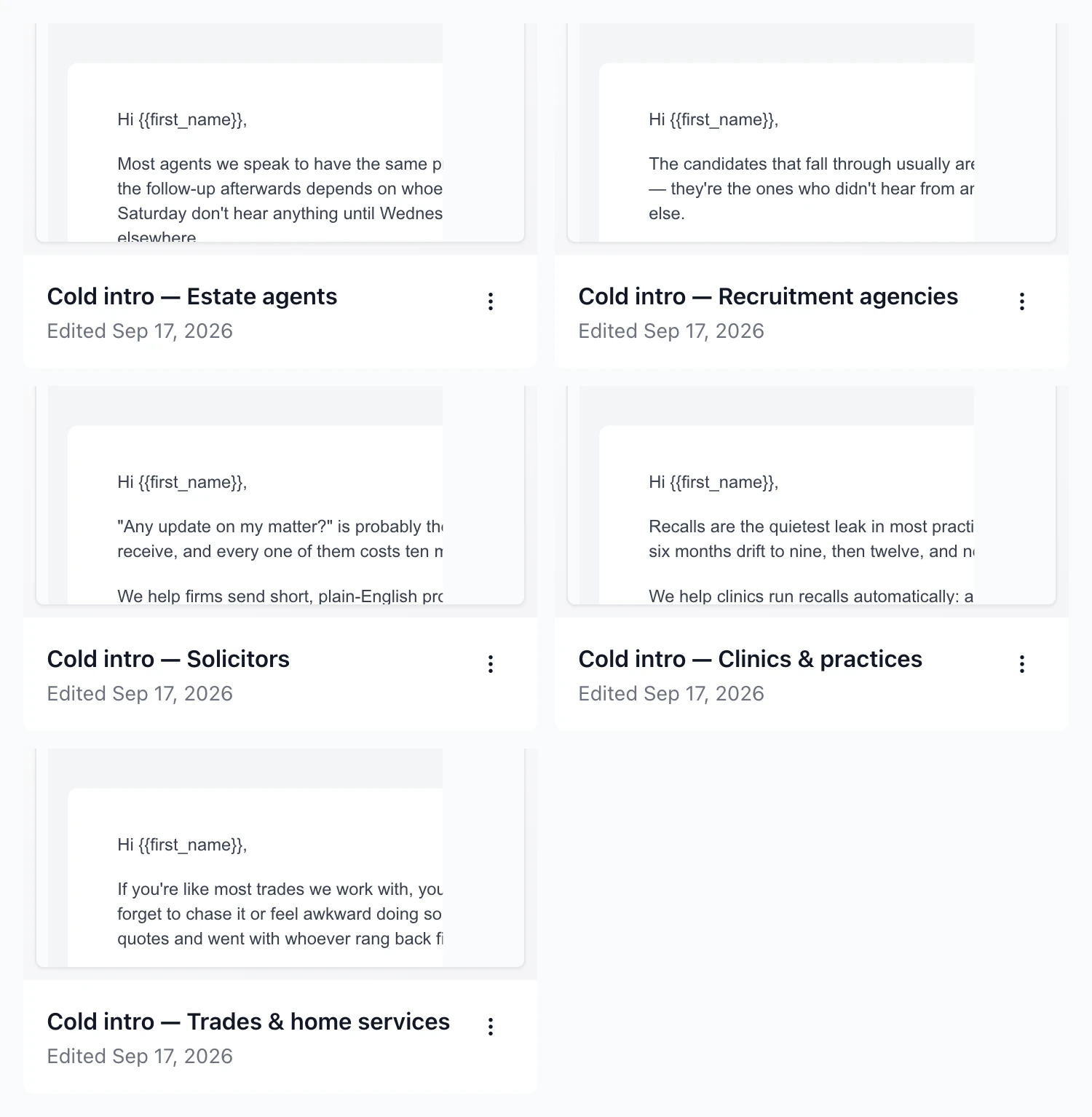
“Build me a cold intro template for each of our five target sectors.”
Five sector-specific templates, each written to that industry's actual problem rather than the same email with the job title swapped.
Connected in about a minute
One key, one paste. No developer, no Zapier, no integration fee.
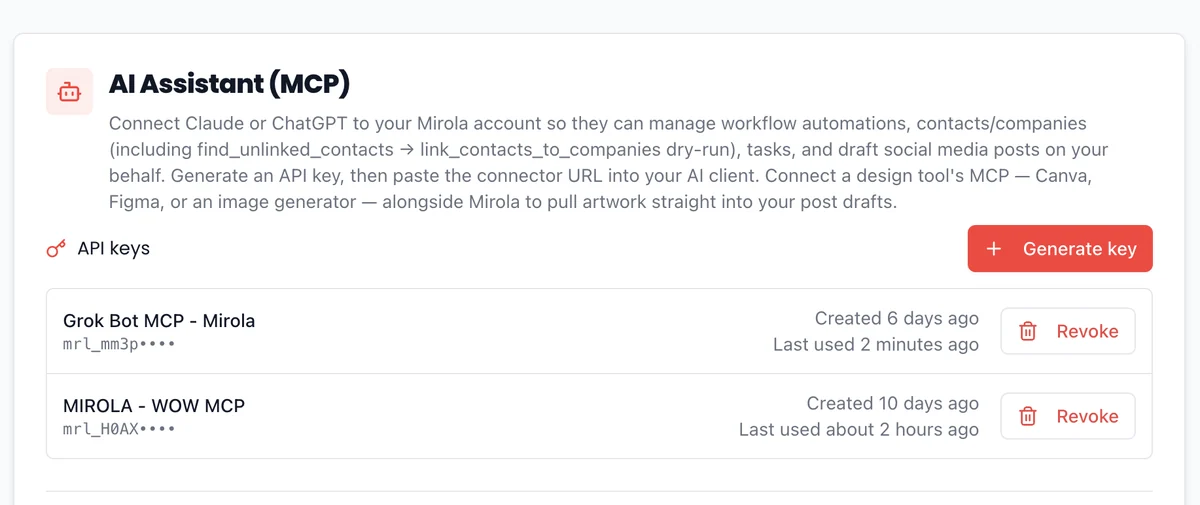
Step 1
Generate a key in Mirola
Settings → AI Assistant (MCP) → Generate key. Name it after wherever you'll use it, so you can tell connectors apart later.
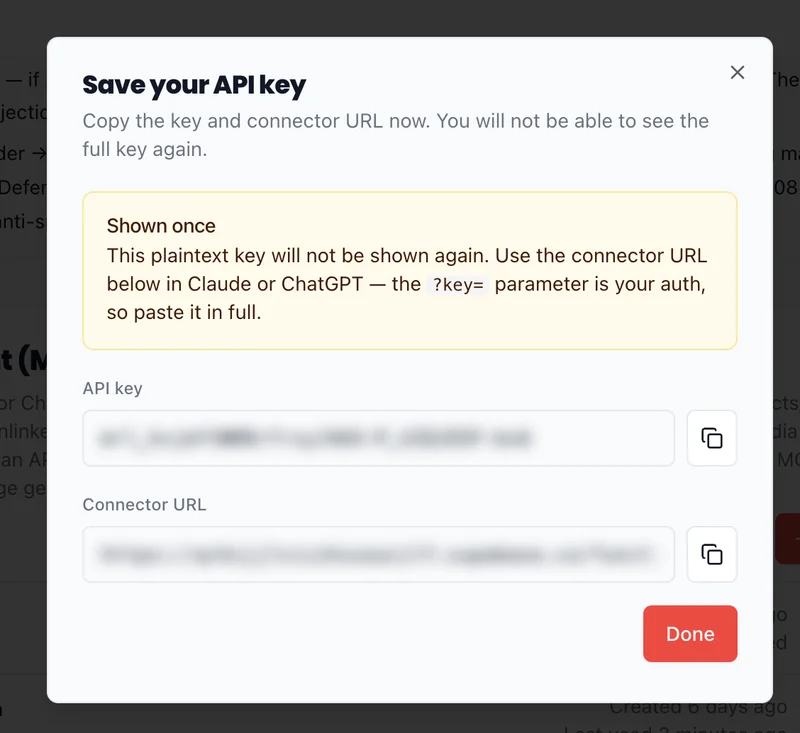
Step 2
Copy the connector URL
Mirola shows the key and the connector URL once. Copy the URL in full — the key is part of it, so there's no separate sign-in to set up.
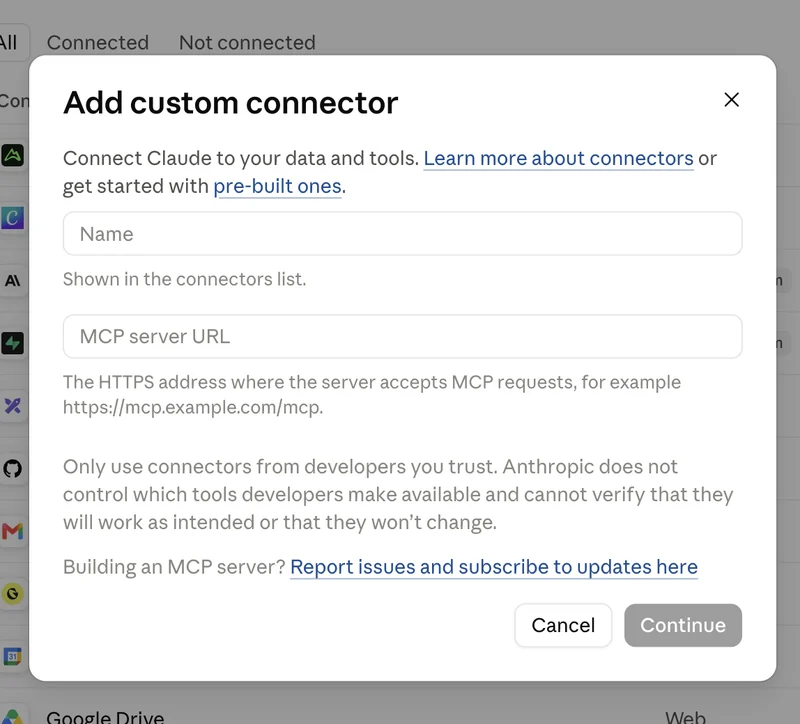
Step 3
Paste it into Claude or ChatGPT
In Claude: Settings → Connectors → Add custom connector. Paste the URL, leave the OAuth fields empty, click Add. ChatGPT is the same idea under Settings → Apps.
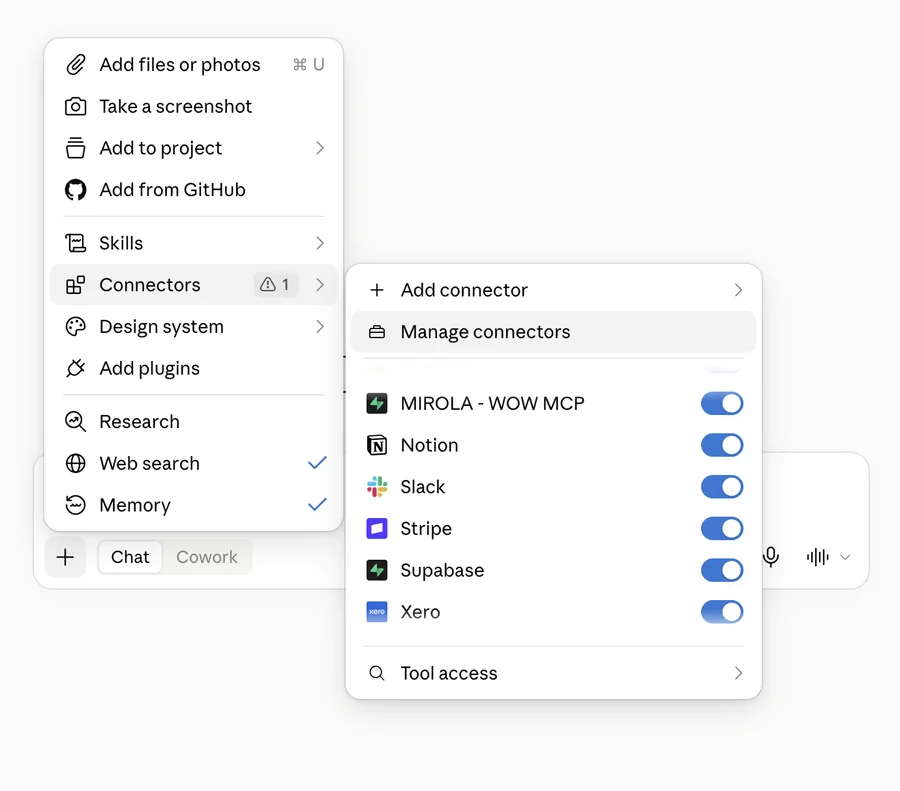
That’s it. Mirola now sits in your connector list alongside everything else you’ve hooked up, and you can start asking.
Those four barely scratch it
There are 100+ things it can do in your account. Here’s the shape of it.
Contacts
Add, update, merge duplicates, tag, archive, write notes onto the timeline, link people to the right companies
Companies
The same, plus adding up to fifty at once from a list you paste in
Create record types
Define a new record type — like vendors, properties, cases etc — Mirola creates it for you
Opportunities
Build pipelines and stages, move deals along, mark them won or lost with a reason
Tasks
Create, assign, set priorities and reminders, add checklists, tick items off, comment
Email templates
Write them, edit them, keep them in Marketing ready to send
Campaigns
Pull the email stats, and find the contacts who genuinely engaged and drill down for your sales team
Workflows
Build one, edit it in place, pause or activate, enrol people, delete it, and ask why it didn't fire
Social
Draft posts across your connected accounts and pulled artwork from other MCP connectors like Canva or Figma
Suppressions
Add, remove and review who shouldn't be contacted
Bulk changes
Transform a field across thousands of records — and undo it if it goes wrong
Every bulk change can be undone.
Before a bulk edit runs, Mirola snapshots what it’s about to change. If the result isn’t what you wanted, one instruction puts it back. That’s the difference between letting an AI near your data and letting it near your data safely.
Built for people who don’t have an ops team
If admin is something you do between the actual work, this is for you.
Estate Agents
Every viewing chased the same day — just say so, and it's in your CRM.
Coaches & Consultants
Ask it to warm up prospects and book the next session for you.
Trades & Home Services
Quotes go cold fast; one sentence puts chase tasks on the right jobs.
eCommerce Brands
Who clicked and who bought — pull them out and queue the follow-ups.
Agencies
Client templates and pipeline stages, drafted in chat, saved in the account.
Local Service Businesses
Keep regulars coming back: set the recalls and reminders with a single ask.
Not on the list? The connection isn’t sector-specific — it does whatever your CRM does.
Six reasons this isn’t the usual AI bolt-on
No comparison tables. Just what you get here that you don’t get elsewhere.
It uses the AI you already pay for
Your Claude or ChatGPT subscription does the thinking. Mirola charges nothing to connect it — no AI seat, no credits, no per-action fee on top of your plan.
It finishes the job
Ask for five templates and five templates exist in your account. Not five drafts in a chat window for you to copy across one at a time.
It builds the automation, not just the content
Describe a workflow in a sentence and it gets built. Ask why one didn't fire for somebody and it tells you. Most tools stop at writing the email.
Big changes can be undone
Before a bulk edit runs, Mirola takes a snapshot. If the result isn't what you meant, one instruction puts it back. That's what makes it safe to let it loose on real data.
Field A → BSnapshot restoreUnsubscribes stay unsubscribed
When someone opts out, Mirola remembers — permanently, at account level. Delete the contact, re-import them from an old spreadsheet, add them again by hand: they still won't be emailed. Bad data can't sneak back in through the side door.
Built and supported in the UK
Same time zone, same working day. When you need help you're not waiting overnight for a reply from another continent — and you're talking to the person who built it, not a first-line script.
Included on every plan, from £39/month.
Questions people actually ask
Try it on your own data
Fourteen days. Connect it in a minute and give it the job you’ve been putting off.
Included on every plan · Cancel anytime · Your data stays yours
Stay in the Loop of

Get the latest updates, feature releases and marketing tips straight to your inbox.
No spam. Unsubscribe anytime.View News